
Work your radar
How to read the states on your radar and what each action does.
Your radar is your home screen in Norian. Every open commitment or request shows up here as a card, and each card is marked with a state so you know what it's waiting on at a glance:
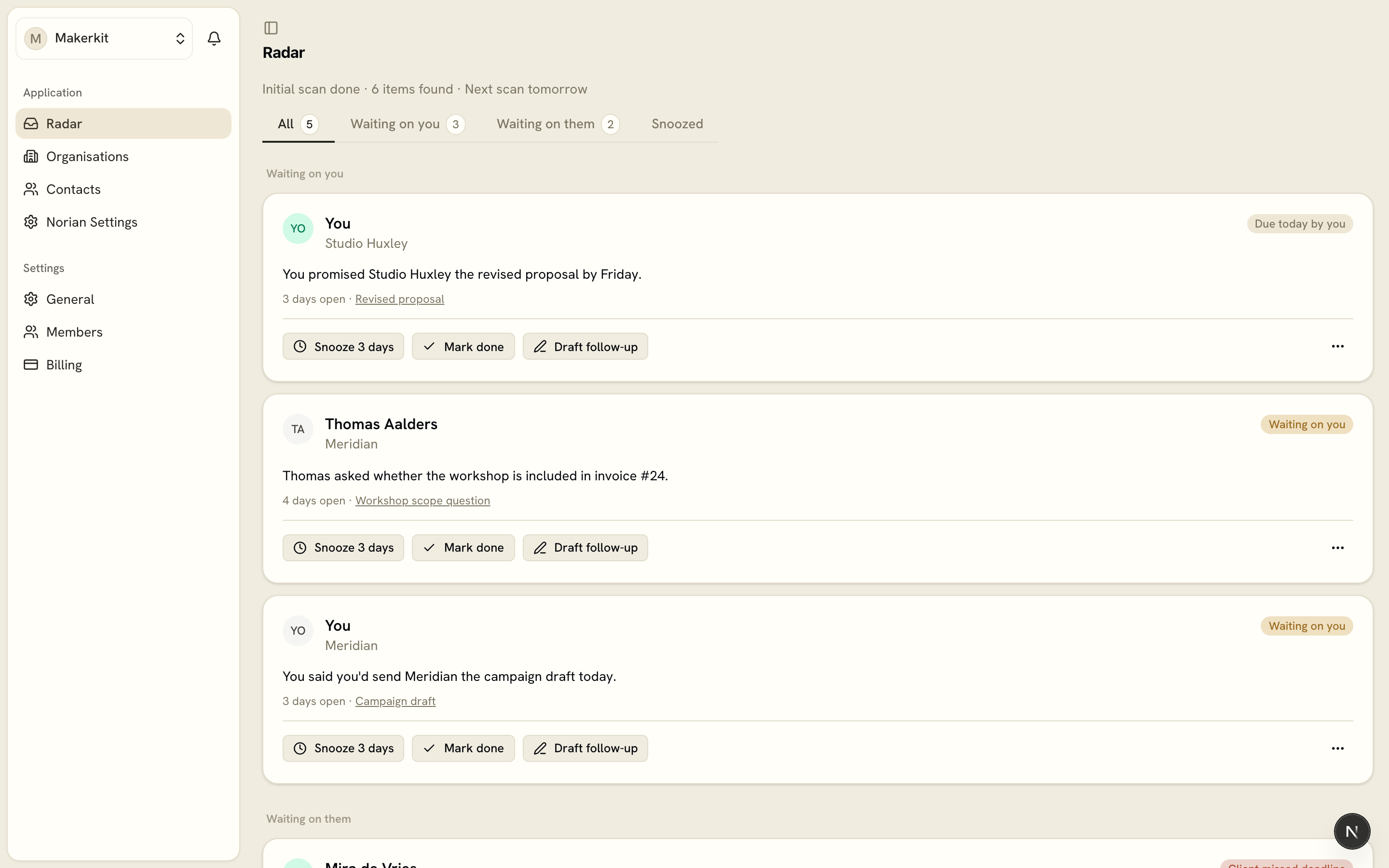
- Waiting on you - something you owe, or something a client asked for
- Waiting on them - something you're waiting to hear back on
- Due today by you - a commitment with today's date on it
- Client missed deadline - a client commitment that's now open past its date
These states come from what we can see in your connected channels, not from a judgment about who's at fault. If something was actually handled on a call or in a channel we don't watch, it can still show up here until it resolves on its own or you tell us otherwise.
Tabs at the top let you filter the view: All, Waiting on you, Waiting on them, and Snoozed.
Each card has a few actions available:
- Mark done - the item is resolved, remove it from the radar
- Snooze - come back to it in a few days
- I've got this - stop the reminders, but we'll keep watching quietly and close it ourselves if it resolves
- Not relevant to me - hide it from your radar
- Report as false positive (on a team) - flag that this shouldn't have been caught at all
You can also add an item by hand from the radar, for anything you want tracked that we didn't catch on our own.
If you're curious about why something was or wasn't caught, Accuracy and your control covers how confidence and correction work.